Binyamin Basteker
View All Worksby Fmeaddons
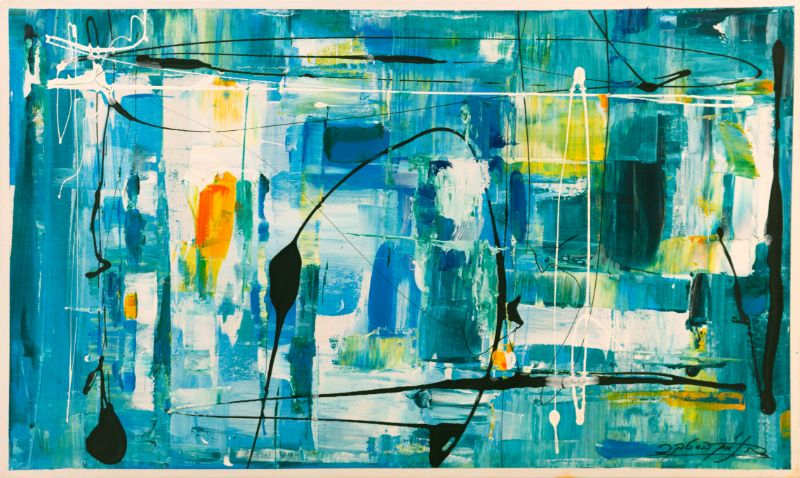
Binyamin BastekerJerusalem winter, 2019
Binyamin Basteker, Jerusalem winter
About the Artwork
In Jerusalem Winter, Binyamin Basteker captures the quiet beauty and distinctive atmosphere of the Holy City during the colder months of the year. Through a restrained palette of blues, turquoise, whites, and subtle golden accents, the artist evokes the cool light, reflective skies, and contemplative mood that descend upon Jerusalem in winter.
Read more
Working in his distinctive abstract expressionist style, Basteker reduces the city to its essential impressions of color, light, and space. Architectural forms emerge through translucent layers of paint, appearing and disappearing like buildings seen through mist, rain, or winter light. The composition suggests a city transformed by the season, where familiar streets and structures take on a softer, more introspective character.
Fluid gestures, sweeping lines, and delicate drips animate the surface, creating a sense of movement beneath the painting's calm exterior. The interplay between geometric forms and spontaneous marks reflects the meeting of structure and atmosphere, permanence and change. Small passages of warm color glow from within the cool palette, recalling sunlight breaking through clouds or the warmth of life within the city.
Rather than depicting a specific view, Basteker conveys the emotional experience of Jerusalem in winter. The city becomes a place of reflection and quiet renewal, where the changing season reveals new dimensions of light, color, and mood. The painting invites viewers to slow down and experience the subtle beauty that emerges when the city's familiar energy gives way to stillness.
Rich in atmosphere and understated elegance, Jerusalem Winter transforms the landscape of the city into a meditation on light, season, and memory. Through its luminous palette and expressive abstraction, the work captures the serene and contemplative spirit of Jerusalem in winter.
₪ 22,750
Drag the artwork to place it on the wall.
Step 1: Straighten the photo
Drag the corners beyond the photo edges as needed. The image follows the handles. Then choose “Apply correction”.
The photo is not cropped automatically. Adjust any edge as needed; the top stays in place unless you move it.
You can download the photo and ask ChatGPT to straighten the wall while preserving the full room and avoiding a top crop. Then upload the edited photo here. Open ChatGPT
Step 2: Set measurements
Enter the real size of a known span and adjust the rectangle to match it. This sets preview scale only; it does not limit artwork placement.
Preparing your framed artwork for AR…