Binyamin Basteker
View All Worksby Fmeaddons
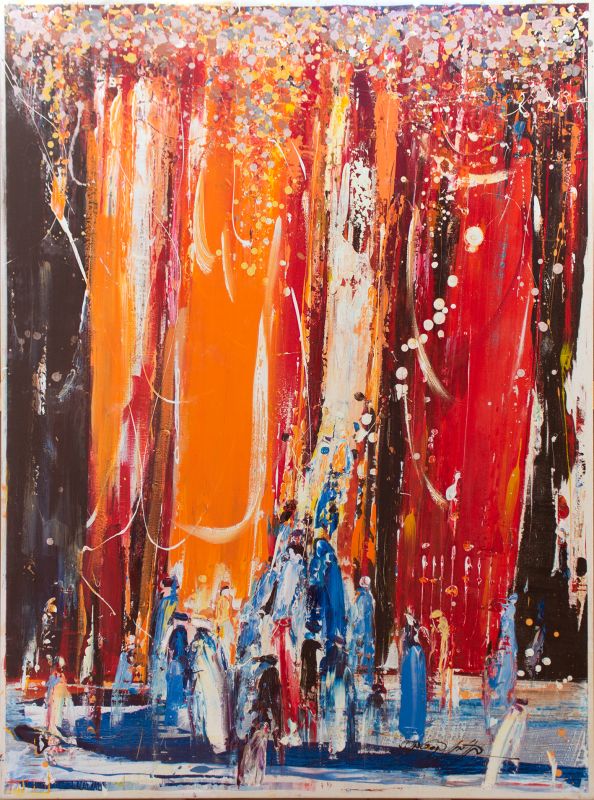
Binyamin BastekerChariot of Fire, 2022
Binyamin Basteker, Chariot of Fire
About the Artwork
In Chariot of Fire, Binyamin Basteker draws inspiration from one of the most dramatic and awe-inspiring moments in the Bible—the ascent of the prophet Elijah in a chariot of fire. Rather than depicting the event literally, the artist evokes its spiritual intensity through a powerful composition of color, light, and movement.
Read more
Towering columns of radiant orange, red, and gold dominate the canvas, creating a sense of ascending energy and Divine presence. These luminous forms rise from the earth like flames reaching toward the heavens, transforming the composition into a visual expression of transcendence and revelation. Beneath them, figures gather in witness, their forms emerging from the paint as participants in a moment that transcends ordinary experience.
Working in his distinctive abstract expressionist style, Basteker uses layers of color, drips, and gestural marks to create a sense of movement that extends beyond the boundaries of the canvas. Light appears to pour through the composition, while countless points of color shimmer like sparks suspended in the air. The result is a work that conveys both immense power and profound spiritual mystery.
Rather than focusing on narrative detail, the painting explores the emotional and symbolic meaning of Elijah's ascent. The chariot becomes a metaphor for transformation, inspiration, and the connection between the earthly and the Divine. The figures below remind us that moments of revelation are not only witnessed, but experienced, leaving a lasting imprint on those who encounter them.
Rich in color, energy, and spiritual symbolism, Chariot of Fire invites viewers to contemplate themes of faith, transcendence, and the possibility of rising beyond the limitations of the material world. The work reflects Basteker's unique ability to transform biblical imagery into a deeply personal and contemporary visual experience.
₪ 29,750
Drag the artwork to place it on the wall.
Step 1: Straighten the photo
Drag the corners beyond the photo edges as needed. The image follows the handles. Then choose “Apply correction”.
The photo is not cropped automatically. Adjust any edge as needed; the top stays in place unless you move it.
You can download the photo and ask ChatGPT to straighten the wall while preserving the full room and avoiding a top crop. Then upload the edited photo here. Open ChatGPT
Step 2: Set measurements
Enter the real size of a known span and adjust the rectangle to match it. This sets preview scale only; it does not limit artwork placement.
Preparing your framed artwork for AR…