Binyamin Basteker
View All Worksby Fmeaddons
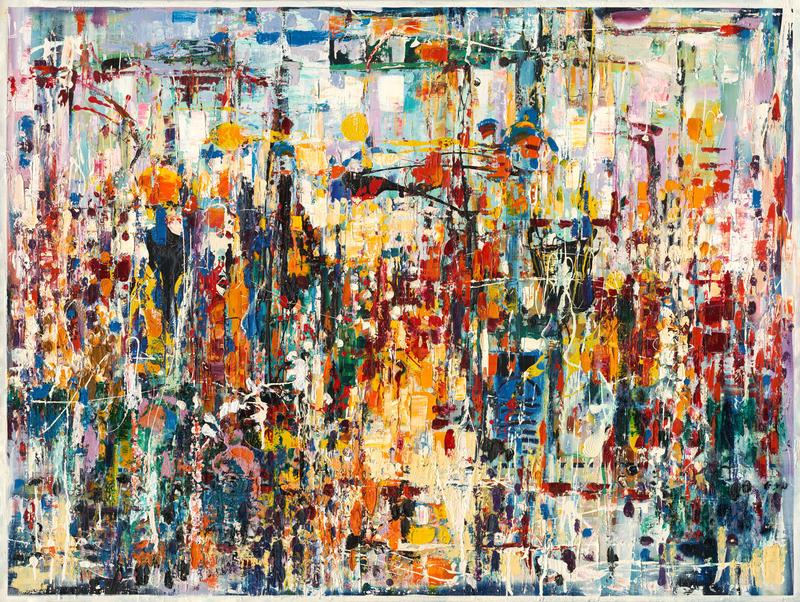
Binyamin BastekerJerusalem street scene
Binyamin Basteker, Jerusalem street scene
About the Artwork
In Jerusalem Street Scene, Binyamin Basteker captures the vitality and complexity of Jerusalem through a rich orchestration of color, texture, and movement. Rather than focusing on a specific location, the artist evokes the experience of walking through the city, where history, culture, faith, and daily life converge in a constantly unfolding visual tapestry.
Read more
The composition is densely layered with vibrant forms, expressive gestures, and luminous passages of color that suggest architecture, streets, markets, and gathering places. Figures emerge and disappear within the intricate network of paint, reflecting the continual flow of people that animates Jerusalem's urban landscape. The city appears alive with conversation, movement, and human connection.
Working in his distinctive abstract expressionist style, Basteker transforms observation into emotion. Brilliant reds, golds, blues, and whites interact across the canvas, creating a dynamic rhythm that mirrors the energy of the city itself. Layers of paint accumulate like memories, echoing Jerusalem's unique character as a place where countless generations have left their mark.
The painting balances abstraction and recognition, allowing viewers to sense the city's presence without relying on specific landmarks. Vertical forms suggest buildings and passageways, while cascading lines and bursts of color create the impression of sunlight, movement, and the vibrant life of the streets. The result is a cityscape that feels both immediate and timeless.
Rich in atmosphere and visual complexity, Jerusalem Street Scene celebrates the enduring spirit of Jerusalem. Through color, gesture, and expressive form, Basteker invites viewers to experience the city not simply as a place, but as a living mosaic of memory, community, and spiritual vitality.
₪ 29,750
Drag the artwork to place it on the wall.
Step 1: Straighten the photo
Drag the corners beyond the photo edges as needed. The image follows the handles. Then choose “Apply correction”.
The photo is not cropped automatically. Adjust any edge as needed; the top stays in place unless you move it.
You can download the photo and ask ChatGPT to straighten the wall while preserving the full room and avoiding a top crop. Then upload the edited photo here. Open ChatGPT
Step 2: Set measurements
Enter the real size of a known span and adjust the rectangle to match it. This sets preview scale only; it does not limit artwork placement.
Preparing your framed artwork for AR…