Binyamin Basteker
View All Worksby Fmeaddons
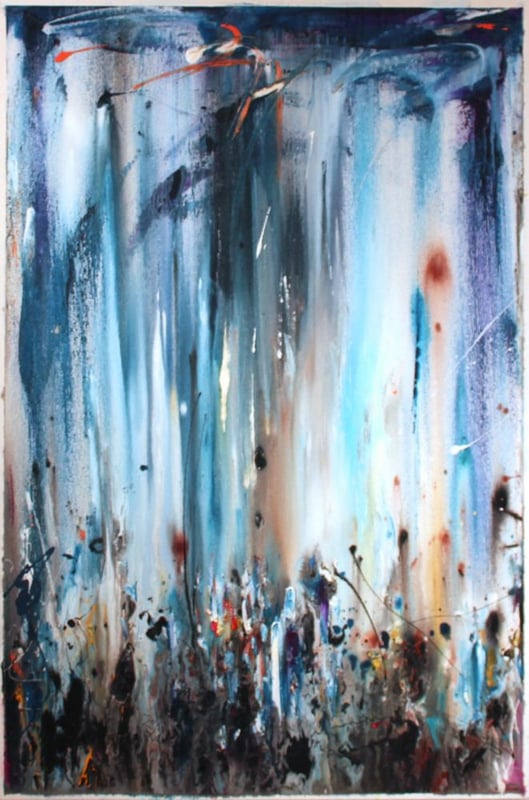
Binyamin BastekerShirat Hayam, 2019
Binyamin Basteker, Shirat Hayam
About the Artwork
Shirat HaYam ("The Song at the Sea") captures the awe, gratitude, and spiritual elevation that followed one of the defining moments in Jewish history. Inspired by the biblical song sung by the Israelites after crossing the Red Sea, Basteker reflects not the miracle itself, but the profound emotional response that emerged in its aftermath.
Read more
The composition is dominated by luminous vertical passages that descend through the canvas like curtains of light. These flowing forms evoke both the towering waters of the sea and the overwhelming sense of Divine presence experienced by those who witnessed the miracle. The boundaries between water, light, and sky dissolve, creating an atmosphere that feels both earthly and transcendent.
At the lower edge of the composition, figures gather in a unified chorus of praise and thanksgiving. Their forms emerge from expressive layers of paint, appearing almost absorbed into the larger spiritual experience surrounding them. Individual identities become secondary to the collective voice of a people celebrating liberation, faith, and redemption.
Working in his distinctive abstract expressionist style, Basteker transforms music into visual form. The cascading movement of paint suggests voices rising upward in song, while subtle variations in tone and texture create a rhythm that echoes the cadence of prayer and praise. The composition conveys both stillness and movement, reflecting the moment when wonder gives way to gratitude.
Rich in atmosphere and spiritual resonance, Shirat HaYam speaks to the enduring power of faith and remembrance. Through luminous color, expressive gesture, and a profound sense of vertical movement, Basteker invites viewers to experience the biblical song not as a distant historical event, but as a timeless expression of gratitude, hope, and spiritual awakening.
₪ 22,750
Drag the artwork to place it on the wall.
Step 1: Straighten the photo
Drag the corners beyond the photo edges as needed. The image follows the handles. Then choose “Apply correction”.
The photo is not cropped automatically. Adjust any edge as needed; the top stays in place unless you move it.
You can download the photo and ask ChatGPT to straighten the wall while preserving the full room and avoiding a top crop. Then upload the edited photo here. Open ChatGPT
Step 2: Set measurements
Enter the real size of a known span and adjust the rectangle to match it. This sets preview scale only; it does not limit artwork placement.
Preparing your framed artwork for AR…